

In today’s fast-paced development world, efficiency and ease of coding are key. Yet, developers often juggle multiple languages, frameworks, and environments just to build one application. Managing separate tools for front-end, back-end, and databases adds complexity, increases integration risks, and slows deployment. Visual LANSA simplifies this process with an all-in-one IDE that handles everything from front-end and back-end development to database management in a single environment. No more switching between tools or managing multiple languages!
In this article, we’ll explore how easy it is to learn and code on Visual LANSA, its key features that streamline coding, and how it simplifies different development stages, from developing and designing to testing and deployment. We’ll then compare it to traditional development methods to understand its impact on speed, learning curve, scalability, and overall ease of use. Whether you’re an experienced developer or new to low-code, this article will provide insight into how Visual LANSA transforms modern application development.
Key Insights
- Visual LANSA enables developers to build and deploy applications across multiple platforms with minimal coding effort.
- With the right resources and courses, developers can master Visual LANSA quickly, making it suitable for both beginners and experienced professionals.
- Visual LANSA accelerates development with pre-built modules, automation, and a unified environment compared to other platforms and traditional methods.
Learning Visual LANSA: What Does It Take?
Starting with a new platform can be intimidating, but Visual LANSA transforms the learning process into an intuitive coding experience. Whether you’re an experienced developer or transitioning into full-stack development, its professional low-code environment helps you focus on logic and functionality rather than getting bogged down in syntax.
To explore the capabilities of Visual LANSA, watch our webinar: Introduction to Visual LANSA: Professional Low-code for IBM i Developers.
Why Choose to Learn Visual LANSA?
- Ideal for all skill levels– Suitable for both experienced developers and those transitioning into full-stack development.
- For experienced developers: You can leverage your existing knowledge of coding, logic, and databases while benefiting from Visual LANSA’s professional low-code features
to speed up development and cross-platform deployment. - For those transitioning into full-stack development: The platform reduces the complexity of traditional programming, making it easier to learn full-stack concepts
without diving deep into multiple programming languages. It also simplifies UI design, backend integration, and database management, helping newcomers build functional applications faster.
- For experienced developers: You can leverage your existing knowledge of coding, logic, and databases while benefiting from Visual LANSA’s professional low-code features
- Low-code efficiency: This reduces the need for deep expertise in traditional programming while still offering robust development capabilities. Read on to learn more about its low-code features.
- Consolidates work in a single IDE: Streamlines UI creation, backend integration, and other essential development processes.
- Quick learning curve: Experienced developers can become proficient in less than two weeks using Learn LANSA resources.
- Beginner-friendly resources available: New developers can start with the Visual LANSA V15 Fundamentals Course to build foundational skills.
Visual LANSA Features that Simplify the Coding Process
Imagine dragging a component onto your canvas and then immediately configuring its data bindings, all without leaving the integrated development environment (IDE). Visual LANSA’s professional low-code solution simplifies application development by reducing the amount of manual coding required, minimizing technical complexity, and shortening training time. With its low-code approach, businesses can build powerful applications quickly, even with limited programming experience.
Learn how to Build Modern Business Applications with Visual LANSA by watching our webinar.
These features reduce the complexity of coding, making application development quicker and more accessible. With a user-friendly interface and streamlined workflow, Visual LANSA enables businesses to create and deploy applications faster while maintaining quality and adaptability.
Drag-and-drop interface
With Visual LANSA, developers can quickly build applications by simply dragging and dropping predefined components, reducing the need for manual coding.
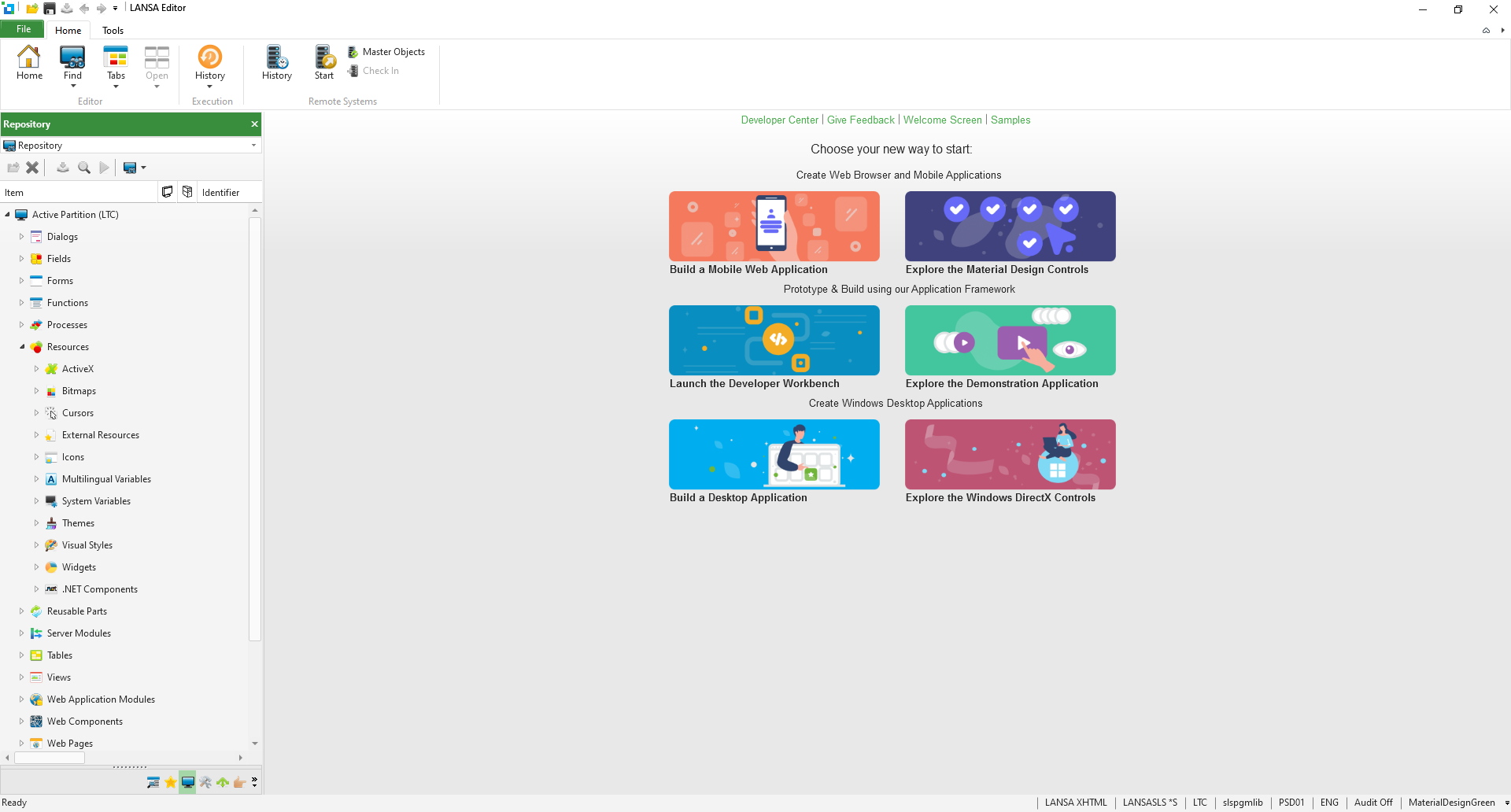
Repository
Developers can leverage the Visual LANSA repository by reusing stored components such as tables, fields, business rules, and system variables instead of manually recreating them for every project. This allows for faster development, improved consistency, and easier application maintenance. By accessing shared assets, teams can collaborate more efficiently, ensuring that business logic and data structures remain uniform across different platforms. The repository also simplifies application updates and enhancements, as changes to a shared component automatically reflect wherever it is used. This approach minimizes redundancy, reduces coding time, and enables developers to focus on refining functionality and delivering high-quality applications faster.
Unified language for front and back ends
Visual LANSA uses RDML (Repository Definition Markup Language) for both front-end and back-end development, allowing developers to build full-stack applications seamlessly. This eliminates the need for specialized teams, improving efficiency and collaboration.
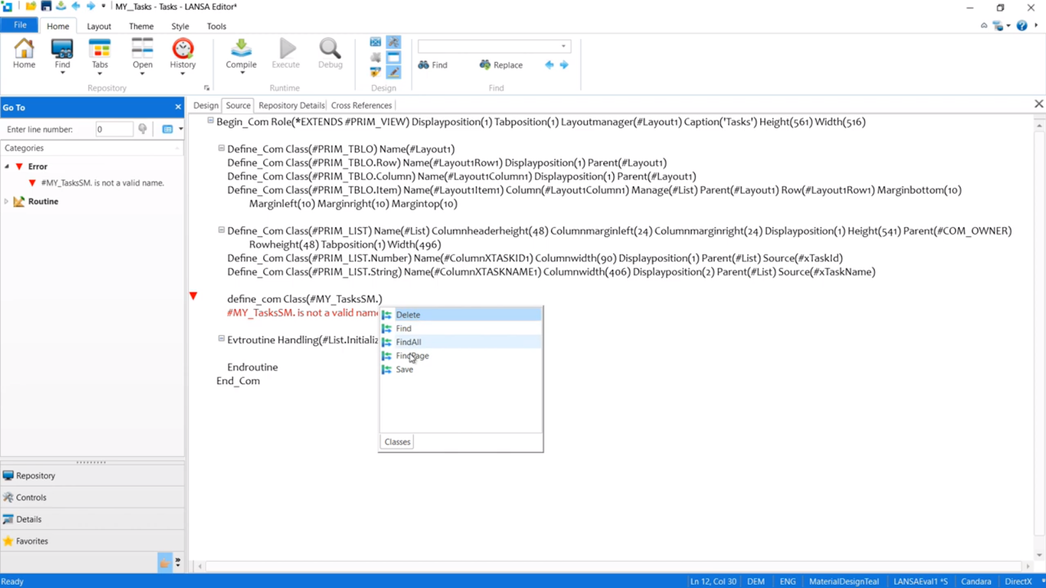
Unlike traditional coding, which requires separate technologies for UI (HTML, JavaScript) and back-end logic (Java, C#, SQL), Visual LANSA unifies them into one structured language.
With RDML and RDMLX, developers can easily:
- Write business logic, database interactions, and UI controls in the same codebase
- Eliminate the need for SQL queries—LANSA handles database operations automatically.
- Create applications that run on IBM i, Windows, web, and cloud without rewriting code.
- Reduce complexity and accelerate development, as developers don’t need to switch between different languages or frameworks.
This unified approach makes application development faster, easier, and more maintainable, allowing developers to focus on functionality rather than managing multiple technologies.
Cross-platform compatibility

Visual LANSA uses a single codebase to enable cross-platform development. Developers use the Visual LANSA IDE to create applications that are compiled into a single cross-platform deployment. There is no longer a need for a distinct code for every platform because the unified codebase ensures consistency across different environments. The deployed applications can run on Windows applications, web applications, and mobile applications while maintaining seamless integration with underlying business logic and databases.
What Can You Build in Days, Weeks, or Months?
Visual LANSA is designed to accelerate development while maintaining flexibility, allowing businesses to bring solutions to market faster. Whether you need a simple tool or a large-scale enterprise application, Visual LANSA adapts to your needs.
- In Days: Quickly build small applications like customer feedback forms or task management tools using pre-built templates and modules. These solutions can be deployed rapidly, reducing manual processes and improving efficiency.
- In Weeks: Develop more advanced applications such as inventory management systems or client-facing portals. With Visual LANSA’s streamlined backend integration and database connectivity, you can create robust, data-driven solutions that enhance business operations.
- In Months: Build enterprise-grade solutions with complex requirements, cross-platform compatibility, and high scalability. Whether it’s a full-fledged ERP system, a sophisticated supply chain management tool, or a custom business application, Visual LANSA enables long-term scalability without sacrificing development speed.
With Visual LANSA, ideas move from concept to reality faster than traditional development methods, ensuring businesses stay ahead of the curve.
How Visual LANSA Handles Different Development Stages?
Visual LANSA streamlines every stage of development with its low-code approach, reducing the need for extensive hand-coding. This allows developers to build, test, and deploy applications faster while maintaining high quality. Here’s how:
1. Developing the application
Visual LANSA’s low-code environment eliminates the need for multiple languages and frameworks, enabling both experienced developers and non-developers to build applications with minimal
coding. Its drag-and-drop components, reusable modules, and built-in business logic simplify development, significantly reducing manual coding efforts. Developers can also easily integrate
APIs without complex code, making third-party connections seamless.
2. Designing UI/UX
The WYSIWYG editor allows users to design responsive interfaces without writing extensive front-end code. Pre-built templates and adaptive layouts ensure that applications work across desktops, tablets, and mobile devices with minimal adjustments. Developers can enhance designs through simple customizations in the Visual LANSA IDE, eliminating the need for deep front-end expertise.
Additionally, Visual LANSA offers a UI Kit, which is a styling toolkit for Figma that allows developers to customize the look and feel of applications without diving into complex CSS or JavaScript. For those who need more control, the platform provides flexibility to tweak UI components within its IDE, making it easy to enhance designs while still benefiting from a low-code approach. This balance between simplicity and customization ensures that applications not only look great but also meet specific business requirements.
Read more: Top 5 Reasons To Download The Free Visual LANSA Material UI Kit Now
3. Testing the application
Its built-in testing tools allow developers to validate code, debug problems, and simulate real-world usage to ensure application reliability. These tools make testing easier by detecting and resolving potential errors early in the development process. Furthermore, teams can easily test cross-platform compatibility, ensuring seamless functionality across a variety of devices and settings. This comprehensive testing approach contributes to high-quality, stable applications with few post-deployment issues.
4. Deploying the application
Visual LANSA’s one-click deployment feature eliminates the need for complex deployment scripts and manual configurations. Applications can be deployed instantly on the web, mobile, and cloud platforms (AWS, Azure, on-premises). Version control and rollback options are built-in, ensuring stable updates without requiring deep DevOps knowledge.
With Visual LANSA, businesses can accelerate software development without relying on extensive programming knowledge. This approach empowers developers and non-developers alike to create powerful applications quickly, reducing project timelines and operational costs. By minimizing the complexity of coding, Visual LANSA makes modern application development more accessible and efficient.
Comparison of Coding Efficiency and Productivity: Visual LANSA vs. Traditional Methods
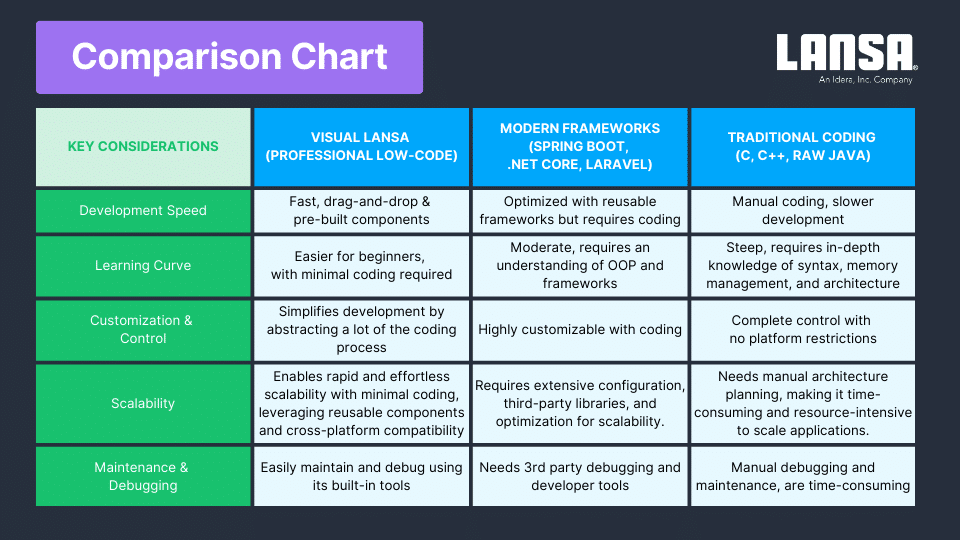
Software development has advanced significantly, with professional low-code platforms like Visual LANSA streamlining the application development process. Unlike traditional development methods, which necessitate manual coding with widely used programming languages and frameworks, Visual LANSA simplifies the process by using a proprietary low-code language that reduces complexity and minimizes the need for extensive programming knowledge. Traditional languages such as Java, C#, and C++ require deep expertise in syntax, object-oriented principles, and memory management, making development more time-consuming and resource-intensive.
This comparison looks at the key differences between Visual LANSA, modern frameworks, and traditional coding methods to determine which approach provides the best balance of speed, scalability, and control with an emphasis on how the underlying programming language impacts development efficiency and accessibility.
Real-world examples of applications built using Visual LANSA
ICS (VISA), Allianz Ireland, and Apria Healthcare used Visual LANSA to modernize systems, improve efficiency, and enhance digital services. From real-time processing to scalable web development and seamless integrations, these companies showcase LANSA’s power in driving innovation.
VISA
As the largest credit card issuer in the Benelux region, ICS has relied on Visual LANSA since 1991 to enhance operations. Instead of manually coding complex financial systems, their developers streamlined workflows and automated processes using LANSA’s Professional low-code environment, significantly reducing development time compared to traditional coding.
Allianz
Allianz Ireland adopted Visual LANSA as a strategic web development tool, replacing Java and WebSphere’s complexity. By using a unified front-end and back-end language, their teams simplified development, enabling faster B2C and B2B project rollouts without needing specialized Java expertise.
Apria
Apria Healthcare used Visual LANSA’s built-in integrations to connect business systems without the extensive coding effort typically required for XML-based data exchange. Later, they modernized their core systems with LANSA’s easy-to-use framework, cutting costs and achieving a seamless transition to paperless order processing—without rewriting everything from scratch.
These success stories prove how Visual LANSA reduces coding effort, accelerates development, and simplifies modernization. Whether replacing outdated architectures or integrating business-critical systems, developers can achieve more with less code, making application development faster, easier, and more efficient.
Want to see Visual LANSA in action? Discover how it empowers IBM i developers to build and modernize applications with ease—watch the video here: Professional Low-Code for IBM i Developers
The “Smarter Way” to Code
Why Visual LANSA?
Visual LANSA combines professional low-code speed with full-stack power, enabling faster development with fewer errors. Its all-in-one IDE simplifies UI, backend logic, and database management, making it efficient and cost-effective.
Final Thoughts
With Visual LANSA, you develop applications faster without learning multiple programming languages. Its intuitive IDE combines low-code simplicity with traditional programming power, making it easy to manage complex processes and integrations while delivering high-quality results.
Watch our webinar below, Professional Low-Code for IBM i Developers, to see how Visual LANSA boosts productivity.
Start Coding with Visual LANSA
Visual LANSA shortens the learning curve, making it accessible for both new and experienced developers. It reduces manual coding while offering powerful development capabilities.
Whether you’re developing a simple tool or a complex enterprise system, Visual LANSA’s professional low-code platform allows you to focus on building great solutions without getting stuck in tedious coding tasks.
It’s easy to learn and get started!
- Get your free Visual LANSA 30-day trial now.
- Learn Visual LANSA in under two weeks.
- Kickstart your journey with the Visual LANSA V15 Fundamentals Course.
- Access structured courses and expert support.